What if the secret to a flawless myQ smart garage control setup has nothing to do with your smartphone and everything to do with the signal reaching your garage rafters? We understand the frustration of staring at a blinking LED light while your Wi-Fi pairing fails for the third time. It is stressful to worry about home security when you are not sure if your older opener is even compatible with modern tech. Most units manufactured after 1993 with standard safety sensors are ready for an upgrade, but your garage environment must be prepared for the connection to hold steady.
You deserve the peace of mind that comes with knowing your home is secure from anywhere. This guide will help you master the installation process, ensuring a stable connection and total remote control. We will walk through compatibility requirements, the physical mounting process, and the advanced troubleshooting steps every Gulf Coast homeowner needs to know. From managing your router distance to understanding the latest app features and Matter protocol integrations, we provide the technical clarity you need to get the job done right the first time.
Key Takeaways
- Confirm your opener was manufactured after 1993 and verify a strong 2.4GHz signal at the installation site to prevent pairing failures.
- Streamline your myQ smart garage control setup by utilizing Bluetooth discovery in the app for a faster, more reliable hardware connection.
- Resolve common connectivity issues quickly by learning how to interpret Hub status lights and troubleshooting "Device Not Found" errors.
- Enhance your daily routine with advanced features like automated closing schedules and secure in-garage delivery services.
- Gain professional insights into the technical differences between integrated Wi-Fi openers and add-on Smart Garage Hub accessories.
What is myQ Smart Garage Control and Is Your Door Compatible?
The myQ platform is a cloud-based ecosystem developed by the Chamberlain Group that allows you to monitor and operate your garage door from a smartphone. It is the standard technology found in most modern LiftMaster and Chamberlain openers. You don't necessarily need to buy a brand-new motor to enjoy these features. A successful myQ smart garage control setup often involves adding a Smart Garage Hub to your existing equipment, turning a traditional opener into a connected device.
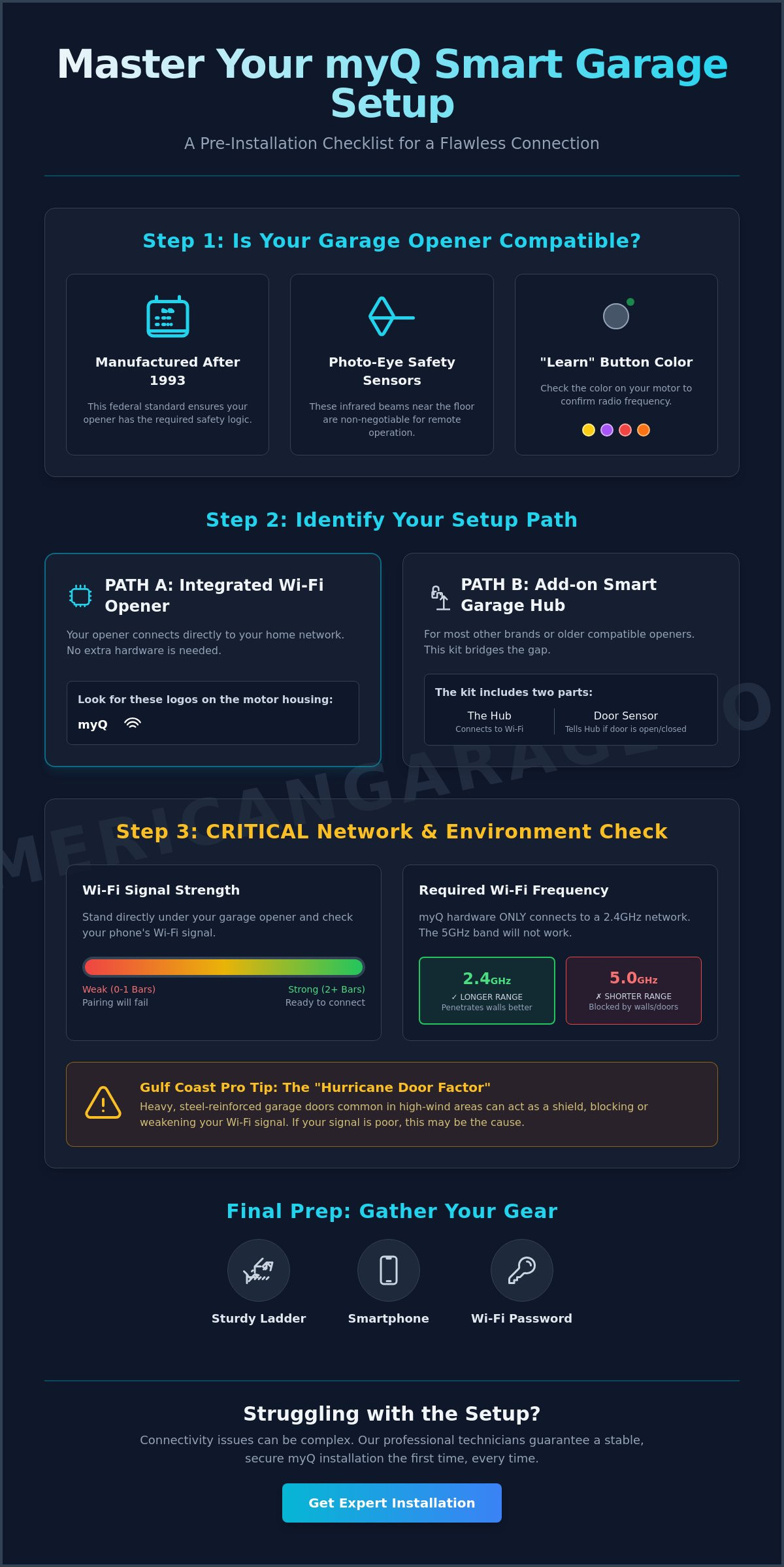
Before you start, you must verify that your system is compatible. The most critical requirement is the presence of photo-eye safety sensors. These are the small infrared sensors located near the floor on both sides of your garage door tracks. If your door lacks these sensors, it cannot be integrated with myQ for safety reasons. The system works with most major brands, including Wayne Dalton, Genie, and Craftsman, provided they meet specific age and safety criteria. Without these sensors, the app cannot safely verify if the path is clear before closing the door remotely.
Checking Your Opener Manufacturing Date
To find your opener's age, look for a white or silver sticker on the motor head. This is usually located under the light cover or on the back panel near the antenna wire. Look for the "MFG Date" or "Date of Manufacture." 1993 is the magic year because that's when federal safety standards required the inclusion of infrared sensors. If your opener was made before 1993, it lacks the necessary logic board architecture for a secure myQ smart garage control setup. You should also check the "Learn" button color on the back of the motor. Modern units typically have a Yellow, Purple, Red, or Orange button. This color tells you which radio frequency the unit uses and determines how the hub will pair with your specific motor.
Built-in Wi-Fi vs. Smart Garage Hub
Many newer units, like the LiftMaster Belt Drive, Chain Drive, or Wall Mount Openers, come with integrated Wi-Fi. You can spot these by the myQ logo and Wi-Fi symbol printed directly on the motor housing. If you see these icons, you don't need extra hardware; the motor connects directly to your router. If your unit is older or a different brand like a Wayne Dalton Classic Steel model with a standard opener, you will need the Smart Garage Hub (Model 821LMC). This kit includes two main parts:
- The Hub: This central brain mounts to the ceiling near your opener and connects to your home Wi-Fi.
- The Door Sensor: This small device attaches to the top panel of your garage door. It uses an internal tilt sensor to tell the hub if the door is open (horizontal) or closed (vertical).
This setup provides a reliable bridge between your home network and the mechanical opener, giving you full control without a total system overhaul.
Pre-Setup Checklist: Network and Environment Readiness
Before you climb the ladder, you must verify your network environment is ready for the connection. A successful myQ smart garage control setup depends entirely on the quality of your Wi-Fi signal at the motor head. Most homeowners assume that if their phone works in the kitchen, the garage is fine. However, the garage is often a dead zone due to distance and construction materials. Grab your smartphone, stand directly under your garage door opener, and check your Wi-Fi bars. If you have fewer than two bars, the hub will likely struggle to stay online, leading to frustrating "offline" messages in the app.
The technical reason for many pairing failures is the Wi-Fi frequency band. Most modern routers are dual-band, broadcasting both 2.4GHz and 5GHz signals. The myQ hardware strictly requires a 2.4GHz connection to function. While 5GHz is faster for streaming video in your living room, 2.4GHz signals travel further through walls than 5GHz. This makes the lower frequency ideal for reaching through the drywall and insulation separating your router from the garage. Ensure your phone is connected to the 2.4GHz band before you begin the pairing process.
Living on the Gulf Coast adds a unique challenge we call the "Hurricane Door Factor." In areas like Baldwin County or Pensacola, homes often feature heavy-duty, steel-reinforced doors designed to withstand high winds. These doors, such as the Wayne Dalton Classic Steel models, are excellent for safety but act like a signal shield. They can bounce Wi-Fi signals away from the opener. If your signal is weak, you may need to relocate your router or install a dedicated access point closer to the garage. You'll also need a sturdy ladder, your smartphone, and your Wi-Fi password ready before you start.
Optimizing Your Home Network for the Garage
If your signal is struggling, skip the cheap plug-in Wi-Fi extenders. These often create a second network name that confuses smart devices. Instead, use a mesh network node. Placing a node in a room adjacent to the garage provides a seamless, high-performance bridge. This stable connection is vital for maintaining the encryption protocols described in recent research on smart garage door opener security, ensuring your home stays protected from digital intrusions.
Preparing the Physical Hardware
Clean the top of your motor head with a dry cloth. Dust and debris can settle on the internal antenna, slightly degrading the signal. Before adding smart features, pull the emergency release cord and manually lift your door. If the door feels heavy or makes grinding noises, your springs may need attention. It's best to ensure your system is in top shape by consulting a professional for garage door track realignment or spring service before relying on remote operation. Finally, make sure the door is fully closed; the app setup often fails if it detects the door is in an intermediate position.
Step-by-Step myQ Smart Garage Control Setup Guide
Now that you've verified your signal strength and prepped the motor, it's time to get connected. Start by downloading the latest version of the myQ app from the Google Play Store or Apple App Store. Create your account using a secure email and look for the verification link in your inbox. You must click this link to activate your profile before the app allows you to add hardware. Once you're logged in, the app will ask for permission to use Bluetooth. Grant this access immediately. Using Bluetooth is the most efficient way to complete your myQ smart garage control setup because it allows your phone to discover the hub without the need for manual serial number entry.
Syncing the app to your specific garage door opener brand is the next critical phase. Whether you have a LiftMaster Chain Drive or a Genie unit, the app will provide brand-specific prompts. You'll need to identify your "Learn" button color again during this stage. The app uses this information to send the correct radio frequency to your motor. After the software handshake is successful, you'll move to the physical installation. A professional-grade installation depends on precise placement to ensure the sensors and hub communicate without interference.
The App Pairing Process
Open the app and tap the "Plus" (+) icon to add a new device. Select "Smart Garage Control" from the list. To put your hub into pairing mode, press and hold the settings button on the side of the unit until the LED starts a blinking blue pattern. This light indicates the hub is broadcasting its own temporary setup network. Follow the prompts to select your home Wi-Fi and enter your password. Accuracy is vital here. A single mistyped character often results in a "Provisioning Error," which requires a full factory reset of the hub to fix.
Mounting the Hardware Like a Pro
Mount the wireless door sensor to the inside of the top garage door panel using the provided adhesive strips or screws. We recommend placing it on the top panel because it's the first part of the door to tilt when opening. This ensures the app registers movement the moment the cycle begins. For the main hub, find a spot on the ceiling near a power outlet. Ensure the hub has a clear line-of-sight to the opener motor. Never mount the hub inside a metal cabinet or directly behind a steel support beam. These metal surfaces act as shields that can block the signal, leading to intermittent connection failures.
Perform a final test by triggering the door from your phone. Stand back and watch the process. You'll notice the hub's light flashes and a warning beep sounds before the door moves. These are built-in safety features that cannot be disabled. If the door completes a full open and close cycle, your myQ smart garage control setup is complete and ready for daily use.
Troubleshooting Common myQ Connection Issues
Technical glitches can happen even with a perfect plan. Don't let a "Device Not Found" message stall your myQ smart garage control setup. This error usually means the hub isn't broadcasting its setup signal or your phone is still clinging to the home Wi-Fi instead of the hub's temporary network. Check the LED light on the hub immediately to understand its status. A blinking blue light means it is ready to pair. A solid green light indicates it is already connected to a network. If you see green but the app isn't working, the hub might be linked to a previous account or an old router configuration.
You might also encounter a "Close Error" in the app. This happens when the system tries to close the door but cannot verify the final position. Often, this isn't a software bug but physical interference. LED light bulbs in the opener motor are a common culprit. Standard LEDs emit radio frequency interference that can "drown out" the signal between the hub and the motor. If your remote range has decreased since installing myQ, swap your garage bulbs for shielded, garage-door-compatible LEDs to clear the signal path.
Fixing Wi-Fi Pairing Failures
If the setup keeps hanging, a factory reset is your best move. Hold the settings button for about 10 seconds until the blue light flashes to clear all previous network data. You should also check your router settings. If your router uses "Smart Connect" to merge 2.4GHz and 5GHz bands, temporarily disable the 5GHz band. This forces your phone and the hub onto the same frequency for a smoother handshake. To reset a LiftMaster opener Wi-Fi logic board, press and hold the black adjustment button on the motor head until you hear three beeps.
Solving Sensor and Range Problems
Range issues often trace back to the door sensor battery. The sensor uses a CR2450 coin cell battery. In the intense Florida heat, these batteries can drain faster than the manufacturer's estimate. This is especially true in uninsulated garages where temperatures regularly exceed 100 degrees. If the app loses track of the door's position, replace the battery first. If the problem persists despite a fresh battery and a strong signal, you may have a hardware failure. In these cases, it is safer to seek a professional garage door opener repair in Pensacola to inspect the logic board or sensor alignment.
If your opener is showing its age or the logic board is failing, contact us for a professional wireless keypad installation or a full system diagnostic. We believe in transparency and integrity, providing you with clear solutions to keep your home secure.
Maximizing Your Smart Garage: Professional Tips & Integration
Completing your myQ smart garage control setup is just the beginning of a truly connected home. You can now use "Schedules" to automate your security routines. Many homeowners worry about whether they remembered to close the garage before bed. By setting a rule in the app to close the door at 10:00 PM every evening, you eliminate that anxiety. You can also enable Amazon Key or Walmart+ InHome Delivery. These services allow verified drivers to place packages safely inside your garage, protecting your deliveries from both porch pirates and the unpredictable Gulf Coast weather.
Integration with wider smart home platforms adds another layer of utility to your system. As of 2026, myQ supports the Matter protocol. This allows you to control your garage through Apple Home, Google Home, or Amazon Alexa from a single interface. If you use a professional security provider like Alarm.com, linking your myQ account allows the garage to close automatically whenever you arm your home. It is an efficient way to ensure your entire perimeter is locked down without checking multiple apps.
Sometimes, adding a smart hub to an aging motor is like putting a new computer in an old truck. If your current unit is noisy or struggles to lift the door, consider upgrading to a LiftMaster Belt Drive opener. These modern units have myQ technology integrated directly into the hardware. They provide much quieter operation and often include battery backup systems. These backups are essential for Pensacola families who need to operate their doors during frequent summer power outages.
Security and Guest Access
Managing who enters your home is simpler with "Guest Access" features. You don't have to hand out physical remotes or share your master Wi-Fi password with neighbors. The app lets you grant temporary digital keys to service workers or friends. You'll receive real-time alerts on your phone every time the door moves. This provides a clear digital log of all activity at your home's largest entrance. It's a vital part of a modern security strategy that emphasizes transparency and control.
When to Call a Professional Technician
Digital troubleshooting has its limits. If you've performed a factory reset and verified your 2.4GHz signal but the door still refuses to respond, your logic board may be failing. Mechanical issues often look like connection problems in the app. Never attempt to perform DIY work on high-tension components like torsion springs or cables. These parts are under extreme pressure and can cause serious injury if they snap. RTS All American Garage Doors helps Pensacola families stay connected by handling these dangerous tasks with precision. We make sure your hardware is just as reliable as your software.
Secure Your Home with a Smarter Garage
Mastering your myQ smart garage control setup transforms your home's largest entrance from a simple mechanical door into a secure, intelligent asset. You now understand that a reliable connection starts with a strong 2.4GHz signal and ends with precise hardware placement. By utilizing automated schedules and secure guest access, you gain both convenience and a higher standard of home protection. These tools ensure you never have to worry about an open door again; they provide the technical foundation for a modern, connected household.
While DIY installation is possible for many, technical hurdles or aging hardware can sometimes stand in the way of a perfect connection. We are a family-owned and operated business that has been serving homeowners across Pensacola and Baldwin County for 15+ years. Our expert LiftMaster certified technicians specialize in complex repairs and new system integrations. If you want the job done right the first time, contact RTS All American Garage Doors for professional LiftMaster installation. We take pride in our craft and are committed to your family's safety. Your smart home journey starts with a solid foundation, and we are here to provide it.
Common Questions About myQ Smart Garage Setup
Is there a monthly fee to use the myQ app for basic garage control?
Basic remote operation for opening, closing, and checking your door status is free for all users. You don't need a subscription for the core features that most homeowners use daily. Some advanced integrations, like geofencing or AI-powered alerts, require a "myQ Premium" subscription which currently costs $35 per year. If you want to integrate with specific smart home ecosystems like Alexa, a "myQ+" subscription is available for $4.99 per month.
Will myQ work with my existing garage door remote controls?
Yes, your existing hand-held remotes, wireless keypads, and wall buttons will continue to work exactly as they did before. The myQ system adds a smartphone layer to your garage but does not replace your physical hardware. It acts as an additional signal to the motor head, which is helpful if you lose a remote or need to let a neighbor in while you're away from home.
Why does my myQ hub keep losing its Wi-Fi connection?
Connection drops usually happen because the hub is more than 50 feet from your router or blocked by heavy construction materials. In our local area, hurricane-rated steel doors can act as a shield that bounces the signal away from the opener. If your myQ smart garage control setup keeps going offline, try moving your router closer or installing a mesh network node in the room adjacent to the garage.
Can I control multiple garage doors with one myQ account?
You can manage multiple garage doors through a single myQ account by adding additional door sensors or hubs. Most Smart Garage Hubs support up to two door sensors, meaning you can control two separate doors from one central unit mounted on the ceiling. For homes with three or more bays, you simply add another hub in the app to expand your coverage.
Does myQ work with Apple HomeKit without a separate bridge?
As of 2026, myQ supports the Matter smart home standard, which allows for native integration with Apple Home, Google Home, and Amazon Alexa. You no longer need the old, separate "Home Bridge" hardware to see your garage door in the Apple Home app. This update makes it much easier to include your garage door in "Arrive Home" scenes or trigger it using Siri voice commands.
What should I do if I change my home Wi-Fi password?
If you update your Wi-Fi password, you must update the network settings within the myQ app's "Device Management" section. You don't need to delete your account or remove the hardware. If the app won't accept the new credentials, perform a factory reset by holding the settings button on the hub for 10 seconds. This clears the old data so you can start the pairing process fresh.
Is myQ compatible with old Wayne Dalton garage door openers?
Most Wayne Dalton units manufactured after 1993 are compatible as long as they have standard safety photo-eye sensors. The myQ Smart Garage Hub works with almost all major brands that use infrared safety beams. If your Wayne Dalton opener is a much older model without these sensors, it cannot be used with myQ for safety reasons, and you should consider a motor upgrade instead.
Can I share myQ access with my family members?
Yes, the "Guest Access" feature allows you to invite family members or service workers to control your door from their own phones. You can invite up to three co-owners and ten guests without sharing your master login credentials. It is a secure way to manage access, and you can revoke these digital keys at any time if you no longer want someone to have entry to your home.